Executive Summary
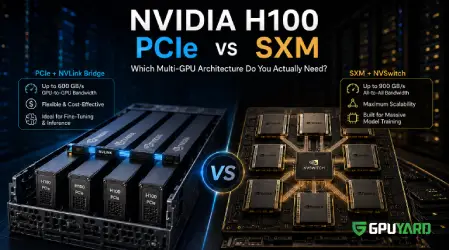
- SXM & NVSwitch: Built for massive, interconnected clusters. It provides an all-to-all 900 GB/s bandwidth topology, ideal for training trillion-parameter models from scratch.
- PCIe Form Factor: The highly versatile, industry-standard interface. While standard PCIe bandwidth is lower, it offers exceptional performance-to-cost ratios for inference and model fine-tuning.
- The NVLink Bridge: You can bypass the traditional PCIe bottleneck by connecting pairs of PCIe GPUs with physical NVLink bridges, unlocking up to 600 GB/s of direct GPU-to-GPU bandwidth.
- Workload Matching: Do not pay for NVSwitch overhead if your workload does not require all-to-all communication across 8+ GPUs simultaneously.
The artificial intelligence arms race has made enterprise-grade GPUs the most sought-after hardware on the planet. For teams building Large Language Models (LLMs) or deploying heavy computer vision pipelines, the NVIDIA H100 Tensor Core GPU is the undisputed standard.
However, acquiring the silicon is only half the battle. When architecting a multi GPU server environment, engineering leaders are faced with a critical hardware decision: PCIe or SXM? Misunderstanding the architectural differences between these two form factors can lead to either massive data transfer bottlenecks or severe budget waste through over-provisioning. In this guide, we will break down the engineering realities of PCIe and SXM, how interconnect topologies dictate training speeds, and how to select the exact hardware footprint your AI workload requires.
The Multi-GPU Communication Bottleneck
To understand why form factor matters, we must first look at how GPUs talk to each other. When a deep learning model is distributed across multiple GPUs using Data Parallelism or Tensor Parallelism, the GPUs must continuously exchange massive amounts of data (like gradients and weight updates) at the end of every computation step.
In a standard server architecture, a GPU connects to the motherboard via a Peripheral Component Interconnect Express (PCIe) slot. If GPU A needs to send data to GPU B, the data must travel over the PCIe bus, through the CPU, and back down to GPU B.
Even on the latest PCIe Gen5 x16 interface, the maximum theoretical bidirectional bandwidth is roughly 128 GB/s. In the context of AI training, this narrow data pathway creates a severe traffic jam, leaving your expensive GPUs sitting idle while they wait for data to arrive.
Decoding the SXM Form Factor and NVSwitch
To solve the multi-GPU bottleneck for extreme workloads, NVIDIA developed the SXM form factor.
Unlike traditional plug-in cards, SXM GPUs are fanless, flat modules that are directly mounted onto a specialized custom motherboard known as an HGX baseboard. This architecture removes standard PCIe limitations entirely.
The magic behind SXM is the NVSwitch. This physical routing chip sits on the HGX board beneath the GPUs, acting as a high-speed network hub. It allows up to 8 GPUs to communicate with every other GPU on the board simultaneously at a blistering 900 GB/s. If you are training a foundation model like GPT-4 from scratch and require rapid all-reduce operations across hundreds of interconnected GPUs, the SXM architecture is mandatory.
The PCIe Form Factor + NVLink Bridge: The Smart Compromise
For 95% of AI startups, research labs, and mid-size enterprises, buying or renting an 8-way HGX SXM server is massive architectural overkill. This is where the standard PCIe form factor, combined with intelligent topology, shines.
PCIe GPUs plug directly into standard server racks. They are highly modular, easier to cool, and significantly more cost-effective. But what about the PCIe bus bottleneck mentioned earlier?
The solution is the NVLink Bridge.
Instead of relying on an expensive central NVSwitch, infrastructure engineers can install physical, low-profile NVLink bridges across the tops of adjacent PCIe GPUs. This creates a dedicated, high-speed highway directly between the cards, bypassing the CPU and PCIe bus entirely. For the NVIDIA H100 PCIe, utilizing NVLink bridges provides up to 600 GB/s of direct bandwidth—nearly matching SXM performance for paired communication tasks at a fraction of the infrastructure cost.
Verifying Your Topology
If you are currently running a multi-GPU setup, you can check exactly how your GPUs are communicating by running a simple command-line utility.
Bash

# Display the GPU interconnect topology matrix
nvidia-smi topo -m
In the output matrix:
- NV#: Indicates the GPUs are communicating via an NVLink bridge.
- SYS / PHB: Indicates the GPUs are falling back to the slower PCIe bus/host bridge.
The GPUYard Advantage: Optimizing Infrastructure Economics
Building an on-premise AI cluster—especially dealing with the intense 700W+ thermal requirements of modern GPUs—is a logistical and financial nightmare for most organizations. Furthermore, paying premium hourly rates in hyperscale clouds for NVSwitch infrastructure you aren't fully utilizing drains runway rapidly.
At GPUYard, we engineered our dedicated server fleet to bridge this exact gap. Our AI-optimized bare metal servers, hosted in premium global data centers like Stockholm, feature configurations of 2x and 4x NVIDIA H100 PCIe GPUs. By leveraging PCIe modularity alongside NVLink bridging, we provide the massive computational horsepower required for LLM fine-tuning, RAG (Retrieval-Augmented Generation) pipelines, and high-throughput inference, while completely eliminating the enterprise markup associated with NVSwitch overhead. You get bare-metal performance, predictable monthly pricing, and zero noisy-neighbor interference.
Matching the GPU to the Workload
You do not always need the H100. Understanding your specific AI pipeline is crucial for cost-efficiency:
- NVIDIA A10 (24GB): The sweet spot for AI inference, serving medium-sized models, and deploying computer vision applications.
- NVIDIA A40 (48GB): Excellent for visual computing, rendering, Stable Diffusion, and running inference on quantized LLMs.
- NVIDIA H100 PCIe (80GB): The powerhouse for heavy LLM fine-tuning (LoRA/QLoRA), complex multi-modal training, and serving massive parameter models at scale.
Conclusion
When architecting for artificial intelligence, throwing an unlimited budget at the most expensive hardware is not engineering; it is simply spending. The SXM form factor is an incredible technological achievement, but it is purpose-built for the top 1% of distributed training workloads. For the vast majority of inference, fine-tuning, and deployment pipelines, PCIe GPUs paired with NVLink bridges deliver elite, bottleneck-free performance without the architectural bloat.
Frequently Asked Questions (FAQ)
Ready to scale your AI workloads without the hyperscale price tag?
Explore GPUYard’s high-performance Dedicated GPU Servers and deploy your bare-metal H100, A40, or A10 environments today.
 Recent Topics for you