
1. Introduction: The VRAM Bottleneck in AI Agents
As highlighted in our 2026 Guide to Scaling LLM Inference, memory bandwidth is the primary bottleneck. What exactly is KV Cache? KV (Key-Value) cache is the memory a Large Language Model uses during inference to store the key and value tensors of previously processed tokens By caching these representations, the model avoids recomputing attention for the entire sequence at each step, significantly accelerating generation while consuming substantial VRAM.
KV cache is the memory an LLM uses during inference to store the key and value tensors from every previously processed token, so the model doesn't have to recompute attention over the full sequence at each new step. It grows linearly with batch size and context length, and on long-running agent workloads it typically consumes far more VRAM than the model weights themselves.
Most teams size their GPUs around model weights and treat everything else as headroom. That assumption breaks down fast in production. A single agent holding a 32K-token context can pin down tens of gigabytes of VRAM before a single output token is generated. Multiply that by concurrent users or parallel agent sessions, and out-of-memory (OOM) errors stop being an edge case and start being a deployment blocker.
This guide breaks down the math behind KV cache growth, the optimization techniques that keep it under control, and a working PagedAttention setup using vLLM.
2. The Math: Calculating KV Cache Memory Footprint
Before optimizing anything, it helps to see exactly where the memory goes. The KV cache footprint scales with these variables:
Memory = 2 × batch_size × seq_len × num_layers × num_kv_heads × head_dim × precision_bytesThe leading 2 accounts for storing both the Key and Value tensors. num_kv_heads matters more than people expect — models using Grouped-Query Attention (GQA) store far fewer KV heads than query heads, which is one of the biggest architectural levers for cache size.
Real-world example — Llama 2 70B at a 32K context window:
Llama 2 70B's published architecture uses 80 transformer layers, 8 key-value heads (GQA), a head dimension of 128, and runs natively at FP16 (2 bytes per value).
For a single sequence at a 32,768-token context:
Memory = 2 × 1 × 32,768 × 80 × 8 × 128 × 2 bytes
       = 10,737,418,240 bytes
       ≈ 10.74 GB per sequence
That's roughly 10.74 GB of VRAM consumed by the KV cache for one user, before accounting for the model weights (~140 GB in FP16) or any additional concurrent sessions. If the same model used standard multi-head attention instead of GQA (64 heads instead of 8), that number would scale to over 85 GB per sequence — which is precisely why GQA has become standard in modern open-weight models. This is also why five concurrent long-context users can exhaust an 80GB H100 before the model has even started generating meaningful throughput.
3. Core KV Cache Optimization Techniques
Each of the following techniques targets a different part of the memory-waste problem. In production, they're typically combined rather than used in isolation.
PagedAttention (The OS Virtual Memory Approach)
PagedAttention, introduced in the vLLM research paper, applies the same logic operating systems use for virtual memory to GPU memory management. Instead of reserving one large, contiguous memory block per sequence, it splits the KV cache into fixed-size, non-contiguous blocks and tracks them with a block table — similar to how an OS maps virtual pages to physical RAM.
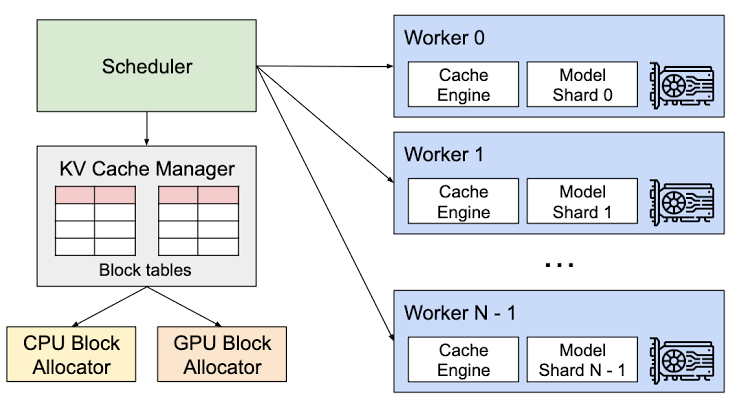
Prior serving systems commonly wasted 60–80% of allocated KV cache memory to internal and external fragmentation, since they had to over-provision contiguous blocks for the worst-case sequence length. PagedAttention brings that waste down to under 4%, which directly translates into more concurrent sequences fitting on the same GPU.
KV Cache Quantization (FP8 and INT4)
Quantization reduces the numerical precision used to store cached keys and values — typically from FP16 down to FP8 or INT4. Since the KV cache memory formula scales linearly with precision_bytes, halving precision from FP16 (2 bytes) to FP8 (1 byte) cuts cache memory roughly in half.
The trade-off is accuracy. FP8 KV cache quantization is generally considered safe for most production workloads on modern hardware (Hopper and Blackwell GPUs have native FP8 support), while more aggressive INT4 quantization can introduce measurable degradation on tasks that depend on precise long-range recall, so it's worth validating against your own evaluation set rather than assuming it's a free win.
Prefix Caching (Prompt Sharing)
Many production workloads share a large, static prefix across requests — a system prompt, a RAG-retrieved document, or few-shot examples. Prefix caching stores the KV cache for that shared prefix once and reuses it across every request that starts with the same tokens, instead of recomputing it per request.
This is especially valuable for RAG pipelines and multi-tenant agent systems, where the same context (a knowledge base chunk, a tool schema, a system prompt) is reused thousands of times per hour. It reduces both compute (fewer prefill passes) and memory duplication.
Eviction Policies (StreamingLLM and Heavy-Hitter Approaches)
When VRAM is genuinely full and the cache can't grow further, eviction policies decide which cached tokens to drop. StreamingLLM's approach keeps a small number of initial "attention sink" tokens plus a sliding window of the most recent tokens, discarding the middle of very long conversations while preserving generation stability. Heavy-hitter approaches instead track which tokens receive the most attention weight over time and evict the ones that contribute the least.
These policies trade some long-range recall for the ability to serve effectively unbounded context lengths without OOM errors — useful for long-running agents and chat sessions, less suitable for tasks requiring exact recall of early context (like long-document QA).
4. Step-by-Step Tutorial: Implementing PagedAttention with vLLM
Step 1: Prerequisites and Installation
You'll need a CUDA-capable GPU, a recent NVIDIA driver, and Python 3.9+.
pip install vllmVerify the install and check GPU visibility:
python -c "import vllm; print(vllm.__version__)"
nvidia-smi
Step 2: Starting the Inference Server
vLLM's OpenAI-compatible server enables PagedAttention by default — there's no separate flag to turn it on, since it's the core memory manager. Start the server with a target model:
vllm serve meta-llama/Llama-2-70b-chat-hf \
  --gpu-memory-utilization 0.90 \
  --max-model-len 32768 \
  --dtype float16
--gpu-memory-utilization controls how much of the GPU's VRAM vLLM reserves for model weights plus the paged KV cache pool. --max-model-len caps the maximum context length the server will accept, which directly bounds worst-case per-sequence memory.
Step 3: Enabling Prefix Caching
Prefix caching is available as an explicit flag:
vllm serve meta-llama/Llama-2-70b-chat-hf \
  --gpu-memory-utilization 0.90 \
  --max-model-len 32768 \
  --dtype float16 \
  --enable-prefix-caching
For KV cache quantization (FP8), add:
vllm serve meta-llama/Llama-2-70b-chat-hf \
  --gpu-memory-utilization 0.90 \
  --max-model-len 32768 \
  --enable-prefix-caching \
  --kv-cache-dtype fp8
Note that flag names and defaults shift between vLLM releases — always cross-check vllm serve --help against the version you have installed before deploying.
Step 4: Load Testing
vLLM ships a benchmarking script for measuring throughput and latency under concurrent load:
python -m vllm.entrypoints.openai.api_server \
  --model meta-llama/Llama-2-70b-chat-hf &

python benchmarks/benchmark_serving.py \
  --backend vllm \
  --model meta-llama/Llama-2-70b-chat-hf \
  --num-prompts 100 \
  --request-rate 10
Watch nvidia-smi during the run to confirm memory utilization is climbing toward your configured --gpu-memory-utilization ceiling without spilling into OOM, and compare throughput and time-to-first-token before and after adding --enable-prefix-caching and --kv-cache-dtype fp8 to isolate the impact of each optimization.
5. Performance Benchmarks: What the Published Research Shows
Exact throughput and memory numbers depend heavily on your model, GPU, sequence length distribution, and hardware generation, so treat any single benchmark as directional rather than a guarantee for your workload. That said, the peer-reviewed results behind these techniques are well documented:
| Metric | Naive / Contiguous Allocation | With PagedAttention (vLLM) |
|---|---|---|
| KV cache memory waste | 60–80% (fragmentation) | Under 4% |
| Throughput vs. prior state-of-the-art systems (FasterTransformer, Orca) | Baseline | 2–4x higher at equivalent latency |
| Real-world deployment case (LMSYS Chatbot Arena) - Baseline GPU count | Baseline | 50% fewer GPUs while serving 2–3x more requests/sec |
These figures come from the original PagedAttention research paper (Kwon et al., SOSP 2023) and vLLM's published production case studies. Comparative studies against other serving frameworks under high-concurrency conditions have shown even larger throughput gaps in specific configurations, which underscores that the "right" number for your stack is something worth benchmarking directly with the load test in Step 4, not assumed from a table.
6. Frequently Asked Questions
-
Does KV cache quantization degrade LLM accuracy?
FP8 KV cache quantization typically produces minimal, often negligible, quality degradation on modern hardware with native FP8 support. More aggressive INT4 quantization carries a higher risk of measurable accuracy loss, particularly on tasks requiring precise long-context recall, so it should be validated against a representative evaluation set before production rollout. -
What is the difference between model weights VRAM and KV cache VRAM?
Model weights VRAM is a fixed cost determined by parameter count and precision — it doesn't change based on traffic. KV cache VRAM is dynamic: it grows with every concurrent request and every token of context, which is why it's the more common source of production OOM errors even when the model weights fit comfortably on the GPU. -
Which framework is best for KV cache optimization in 2026?
vLLM remains the most widely adopted open-source option for PagedAttention-based KV cache management, with broad model support and active development. TensorRT-LLM is a strong alternative when you're locked into a single, well-defined model on NVIDIA Hopper or Blackwell hardware and can absorb its engine-compilation overhead. The right choice depends on how much deployment flexibility you need versus how much raw throughput you can extract from a fixed, compiled configuration.